Breaking

Showing posts with label HUAWEI BOARD SOFTWARE. Show all posts

Monday, January 4, 2021

January 04, 2021

Huawei Honor 8C BKK-AL10 Repair Dead Boot And Fix Logo Without Lost imei And Oeminfo

Huawei Honor 8C BKK-AL10 Repair Dead Boot And Fix Logo Without Lost imei And Oeminfo


How to Flashing Huawei Board Software

Download Huawei Board Software https://maazbutt0786.blogspot.com/

Flash File

Download Tools Software & Drive 

Driver Installation

Double-click the Driver Setup file to install the driver. Installation steps are not displayed because the installation is unattended. When the automatic installation is complete
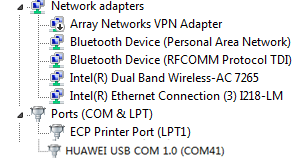
View the HUAWEI USB COM 1.0 of the forcible loading driver under the Device Manager
Click the USB Map, after the port mapping program is started, configure the XML file (this file is an XML file mapped to the target burned version), and then connect the phone to the computer using the loading fixture or by short-circuiting the test point. The port switches from HUAWEI USB COM 1.0 to the Android Debug Bridge (ADB) port. the interface displayed after the mapping is complete. Note that power supply to the PCBA needs to be disconnected during forcible port mapping. To clear mapped ports, click Clear UsbMap.

To map multiple phones at the same time, replace the USB port that connects to the computer, and map the new ports using the same method as described previously

After the mapping is complete, click Done to exit the mapping window. XXXXX
Press Icon Setting  to switch to the main window of the tool

Browse DLL Model and select Model.dll

Browse Config File and select XML From Board File

Software Downloading Success Huawei Board Software

Download :: Link
password :Link

January 04, 2021

Huawei Honor 8C BKK-AL22 Repair Dead Boot And Fix Logo Without Lost imei And Oeminfo

Huawei Honor 8C BKK-AL22 Repair Dead Boot And Fix Logo Without Lost imei And Oeminfo


How to Flashing Huawei Board Software

Download Huawei Board Software https://maazbutt0786.blogspot.com/

Flash File

Download Tools Software & Drive 

Driver Installation

Double-click the Driver Setup file to install the driver. Installation steps are not displayed because the installation is unattended. When the automatic installation is complete
View the HUAWEI USB COM 1.0 of the forcible loading driver under the Device Manager

Click the USB Map, after the port mapping program is started, configure the XML file (this file is an XML file mapped to the target burned version), and then connect the phone to the computer using the loading fixture or by short-circuiting the test point. The port switches from HUAWEI USB COM 1.0 to the Android Debug Bridge (ADB) port. the interface displayed after the mapping is complete. Note that power supply to the PCBA needs to be disconnected during forcible port mapping. To clear mapped ports, click Clear UsbMap.

To map multiple phones at the same time, replace the USB port that connects to the computer, and map the new ports using the same method as described previously

After the mapping is complete, click Done to exit the mapping window. XXXXX
Press Icon Setting  to switch to the main window of the tool

Browse DLL Model and select Model.dll

Browse Config File and select XML From Board File

Software Downloading Success Huawei Board Software

Download :: Link
password :Link

January 04, 2021

Huawei Honor 8C BKK-AL21 Repair Dead Boot And Fix Logo Without Lost imei And Oeminfo

Huawei Honor 8C BKK-AL21 Repair Dead Boot And Fix Logo Without Lost imei And Oeminfo


How to Flashing Huawei Board Software

Download Huawei Board Software https://maazbutt0786.blogspot.com/

Flash File

Download Tools Software & Drive 

Driver Installation

Double-click the Driver Setup file to install the driver. Installation steps are not displayed because the installation is unattended. When the automatic installation is complete
View the HUAWEI USB COM 1.0 of the forcible loading driver under the Device Manager

Click the USB Map, after the port mapping program is started, configure the XML file (this file is an XML file mapped to the target burned version), and then connect the phone to the computer using the loading fixture or by short-circuiting the test point. The port switches from HUAWEI USB COM 1.0 to the Android Debug Bridge (ADB) port. the interface displayed after the mapping is complete. Note that power supply to the PCBA needs to be disconnected during forcible port mapping. To clear mapped ports, click Clear UsbMap.

To map multiple phones at the same time, replace the USB port that connects to the computer, and map the new ports using the same method as described previously

After the mapping is complete, click Done to exit the mapping window. XXXXX
Press Icon Setting  to switch to the main window of the tool

Browse DLL Model and select Model.dll

Browse Config File and select XML From Board File

Software Downloading Success Huawei Board Software

Download :: Link
password :Link

January 04, 2021

Huawei Honor 8C BKK-AL00 Repair Dead Boot And Fix Logo Without Lost imei And Oeminfo

Huawei Honor 8C BKK-AL00 Repair Dead Boot And Fix Logo Without Lost imei And Oeminfo


How to Flashing Huawei Board Software

Download Huawei Board Software https://maazbutt0786.blogspot.com/

Flash File

Download Tools Software & Drive 

Driver Installation

Double-click the Driver Setup file to install the driver. Installation steps are not displayed because the installation is unattended. When the automatic installation is complete
View the HUAWEI USB COM 1.0 of the forcible loading driver under the Device Manager

Click the USB Map, after the port mapping program is started, configure the XML file (this file is an XML file mapped to the target burned version), and then connect the phone to the computer using the loading fixture or by short-circuiting the test point. The port switches from HUAWEI USB COM 1.0 to the Android Debug Bridge (ADB) port. the interface displayed after the mapping is complete. Note that power supply to the PCBA needs to be disconnected during forcible port mapping. To clear mapped ports, click Clear UsbMap.

To map multiple phones at the same time, replace the USB port that connects to the computer, and map the new ports using the same method as described previously

After the mapping is complete, click Done to exit the mapping window. XXXXX
Press Icon Setting  to switch to the main window of the tool

Browse DLL Model and select Model.dll

Browse Config File and select XML From Board File

Software Downloading Success Huawei Board Software

Download :: Link
password :Link

Saturday, January 2, 2021

January 02, 2021

Honor 7A AUM-L29 Dead Recover Solution + Convert To Globle

Honor 7A AUM-L29 Dead Recover Solution + Convert To Globle


Honor 7A AUM-L29 Dead Recover Solution + Convert To Global
Model: AUM-L29
Brand: Honor 
Country: All
Categories : Featured

Honor 7A AUM-L29 Dead Recover Solution + Convert To Global | Honor AUM-L29 Dead Recover Solution | Honor AUM-L29 Convert To Global

Honor 7A AUM-L29 Dead Recover Solution + Convert To Global

Honor 7A AUM-L29 Dead Recover Solution + Convert To Global

Model: AUM-L29
Brand: Honor 
Country: All
Categories : free free

Honor 7A AUM-L29 Dead Recover Solution + Convert To Global | Honor AUM-L29 Dead Recover Solution | Honor AUM-L29 Convert To Global

Honor 7A AUMHonor 7A AUM-L29 Dead Recover Solution + Convert To Global-L29 Dead Recover Solution + Convert To Global
  • Download Link:: Link
January 02, 2021

Huawei RNE-L21 Dead Boot Repair Without Lost Imei And Oem

Huawei RNE-L21 Dead Boot Repair Without Lost Imei And Oem


RNE-L21 Dead Boot Repair Without Lost IMEI And OEM.zip


Google Drive can't scan this file for viruses.

RHONE-L21S001039_Board Software_general_Android 7.0_EMUI5.1_05022FPB.rar (1.4G) is too large for Google to scan for viruses. Would you still like to download this file?

  • Download Link:: Link

Monday, December 28, 2020

December 28, 2020

Huawei Honor 8C BKK-LX2 Repair Dead Boot And Fix Logo Without Lost imei And Oeminfo

 Huawei Honor 8C BKK-LX2 Repair Dead Boot And Fix Logo Without Lost imei And Oeminfo


How to Flashing Huawei Board Software

Download Huawei Board Software https://maazbutt0786.blogspot.com/

Flash File

Download Tools Software & Drive 

Driver Installation

Double-click the Driver Setup file to install the driver. Installation steps are not displayed because the installation is unattended. When the automatic installation is complete
View the HUAWEI USB COM 1.0 of the forcible loading driver under the Device Manager

Click the USB Map, after the port mapping program is started, configure the XML file (this file is an XML file mapped to the target burned version), and then connect the phone to the computer using the loading fixture or by short-circuiting the test point. The port switches from HUAWEI USB COM 1.0 to the Android Debug Bridge (ADB) port. the interface displayed after the mapping is complete. Note that power supply to the PCBA needs to be disconnected during forcible port mapping. To clear mapped ports, click Clear UsbMap.

To map multiple phones at the same time, replace the USB port that connects to the computer, and map the new ports using the same method as described previously

After the mapping is complete, click Done to exit the mapping window. XXXXX
Press Icon Setting  to switch to the main window of the tool

Browse DLL Model and select Model.dll

Browse Config File and select XML From Board File

Software Downloading Success Huawei Board Software

Download :: Link
password :Link

Windows 10 Pro v1903 x64 en-US Activated-KBO

 Windows 10 Pro v1903 x64 en-US Activated-KBO Free  Microsoft Windows 10 Pro v1903 x64 en-US Activated-KBO [ RELEASE INFO ] Sponsored Advert...